This process helps your team bridge the gap between known email addresses and real-time website behavior. By sending a link from Positive User, you attach a tracking cookie to the person's browser, allowing you to see how they interact with your pages even if they haven't logged in.
When you first start using a platform like Positive User, you often arrive with a list of contacts you already know - your import from a previous newsletter or a customer spreadsheet. While you have their email addresses, there is a small "missing link": your website doesn’t recognize them yet.
To your website, these people are still anonymous visitors until they do something to identify themselves. The easiest, most seamless way to fix this is through a simple email click.
Think of this process as a digital handshake that introduces your email list to your website tracking. Here is how that magic happens behind the scenes.

When you send an email through Positive User, the system does something special to the links you include. When your email is sent, the system automatically attaches a tiny, unique "ID tag" to the end of your links.
/?__ca__chat=XXXXXwhere XXXXX is a “Contact key” value.
The Positive User widget (a small snippet of code living on your website) is constantly "listening" for specific URL patterns. When a person lands on the site, the widget immediately scans the URL for that ca__chat parameter.
Once the widget detects the unique key, it matches the unique key from the URL to the specific contact profile in your database.
The browser is now "married" to the email profile. From this moment forward, the widget no longer needs a special URL; it recognizes the cookie and attributes every page view, button click, and interaction to that specific individual's history.
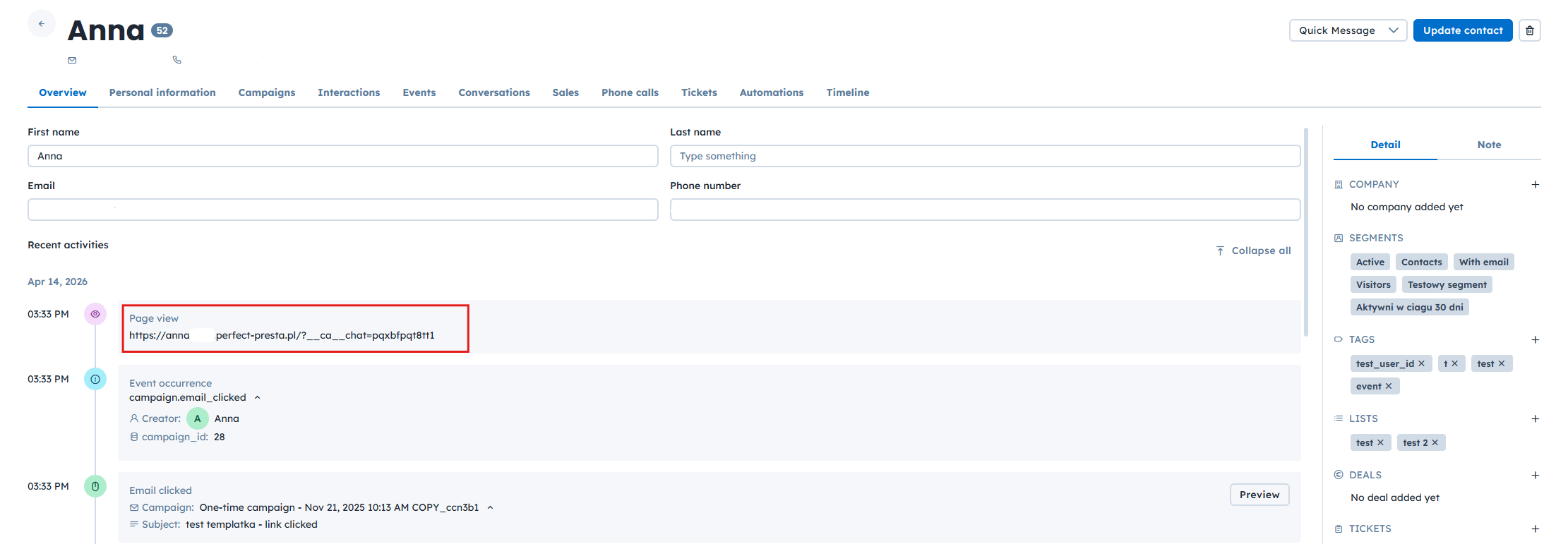
Zero-Friction Identification: Unlike a login wall or a lead form, this identification happens silently in the background. The person simply gets the content they clicked for, while your data becomes enriched.
Identity Restoration: Because cookies can be cleared or expire, the email click serves as a "fail-safe" to re-identify a contact and restore their tracking history instantly.
A Complete Picture: You’ll finally be able to see the full journey from the moment contact opened your email to the specific pages they visited afterward.
Post-Import Tracking: After you import a list of people with email addres via CSV, use this to start seeing which pages they visit on your site after sendig the email campaign.
Refreshing Cookies: If a contact clears their browser data, an email click will instantly restore their tracking history.
Essentially, this method transforms a standard marketing email into an identity verification tool. By using the unique URL parameter as a translator, the system converts a cold database entry into a "hot" tracked contact, allowing for real-time automation, personalized site content, and deep behavioral insights.
