You might have several contacts in your database who are, in fact, the same person. Contacts deduplication helps you clean up duplicates while preserving your valuable data, such as attributes, timelines, and interactions.
This article explains how contacts deduplication works in Positive User, how the base contact is selected, what data is merged, and how to prevent duplicates in the future.
Contact deduplication is a process that identifies and merges duplicate contact records in your database. Duplicates are detected by comparing specific attributes, such as email address, user_id, and status. Once identified, multiple records are merged into one comprehensive contact profile.
The process is handled by the Customer Support team. To start deduplication, you need to contact support via chat in the workspace. You will also need to specify how often the process should run.
Deduplication can be scheduled:
• As a one-time process
• Every 1, 7, or 30 days or at a custom interval
The process runs overnight (CET). If you request deduplication today, you will see the results the next day at the earliest.
The system scans all contacts records and groups together those that share the same email address. From each group, one record is selected as the base contact. This base contact keeps the original timeline and automation history.
The logic behind selecting the 'base user' in the deduplication process is illustrated in the graph below.
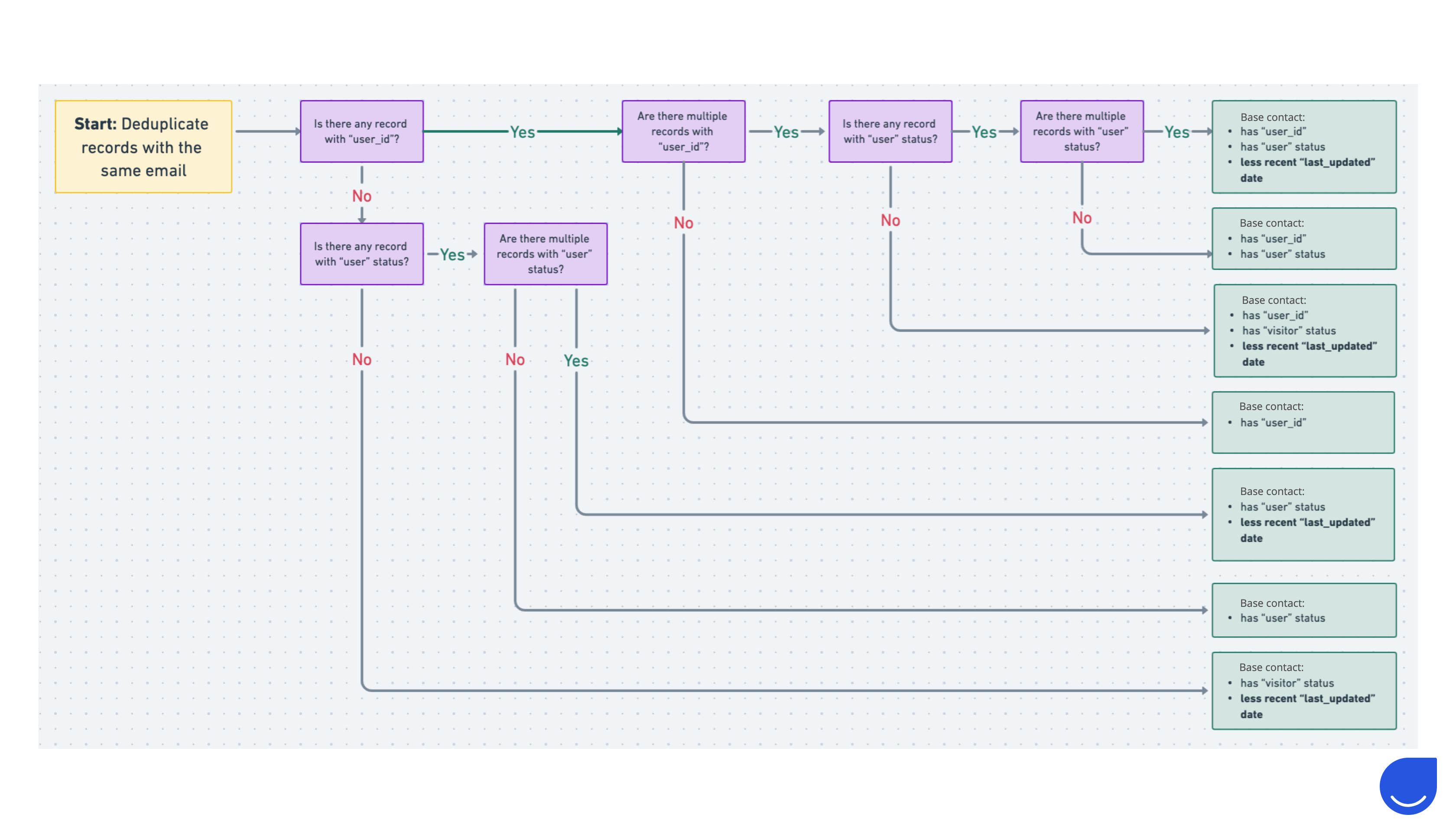
The logic for choosing the base contact follows a strict priority order.
The highest priority is given to records that have a “User ID” attribute value. “User ID” is an optional but unique identifier that you can assign to contacts.
This means:
• Records without a “User ID” have lower priority
• Records with different “User ID”s will never be merged, even if they share the same email address


If “User ID” alone is not enough, the system checks the “Status” attribute.
The “Status” attribute has two possible values:
• Contact
• Visitor
A record with the “contact” status always has priority over a “visitor”. The “contact” status is automatically assigned when an email address is captured via website tracking, but it can also be updated manually or through imports.
If multiple records still qualify after the previous steps, the system compares the “Last updated” date. The record with the older “Last Updated” date becomes the base contact.

If the base contact is missing some attribute values (for example, phone number, city, operating system, or custom attributes), those values are taken from the other records.
If multiple records contain different values for the same attribute:
• “Contact” status has priority over “Visitor”
• If needed, the record with the older “Last Updated” date is used
All interactions are preserved and assigned to the base contact, including:
Chat conversations
Sent messages
Registered events
Assigned deals
Tags
etc..
Page visits are aggregated. For fields like “Last contact”, “Last seen”, or “Last heard from”, the most recent value is kept.
This can affect how automations behave after deduplication.
Example 1
If a contact started an automation but did not become the base contact, the final merged profile will not continue that automation.
Example 2
If a contact triggered an automation through events like “tag added”, “added to the list”, or “attribute change” and did not become the base user, those changes may trigger the automation again after deduplication.
To prevent duplicates, you should carefully define how contact are identified in your setup.
You can do it using the “User ID” attribute or email address authorization.
Make sure your authorization and identification logic is consistent, whether you rely on “User ID” or email address.
