Segments help you keep your database organized and actionable as it grows. Instead of manually filtering data every time you need a specific group, you can define rules once and let the system do the work for you.
By using segments, you always work with up-to-date groups of contacts, companies, deals, and other objects. This makes targeting, personalization, and automation easier, faster, and more reliable across marketing, sales, and support activities.
A segment is a dynamic group of objects created based on predefined criteria. These criteria can include attributes, events, lists, tags, and other data points available in User.com.
Segments update automatically as data changes. When an object no longer meets the segment conditions, it is removed. When it meets them again, it is added back—without any manual action from you.
Segments are more advanced than lists or tags because they can combine multiple filters and conditions into one flexible structure.

You can also manage the segments and decide on the synchronization period. Read about it in this article.
User.com supports several segment types, depending on the object you want to group.
Contacts Segments: These segments group contacts based on attributes, events, behaviors, consents, lists, or tags. Example: contacts who visited your website more than five times in the last month and have marketing consent.
Company Segments: Company segments group companies using criteria such as industry, company size, value, or interaction history. Example: companies from a specific industry with high engagement levels.
Product Segments: These segments help you organize products based on sales performance or other properties. Example: top-selling products or products with low sales volume.
Deal Segments: The ones that allow sales teams to group deals by value, stage, or probability. Example: high-value deals that are close to closing.
Tasks Segments: These segments organize tasks assigned to your team, such as calls, follow-ups, or emails. Example: overdue tasks assigned to a specific team member.
Ticket Segments: Ticket segments help support teams manage incoming tickets efficiently. Example: high-priority tickets waiting for a first response.
To create a segment, start by choosing the object type you want to segment. Each segment type is created from a different area of the application.
Contacts Segments: Data → Contacts
Company Segments: Data → Companies
Product Segments: Data → Products
Deal Segments: Sales → Deals → Table view
Tasks Segments: Sales → Tasks
Ticket Segments: Customer Service → Support tickets
In the selected section, use filters to define the conditions for your segment. Filters can include attributes, events, lists, tags, and other available data sources.
Example: Creating a Contacts Segment
Go to the Data → Contacts section
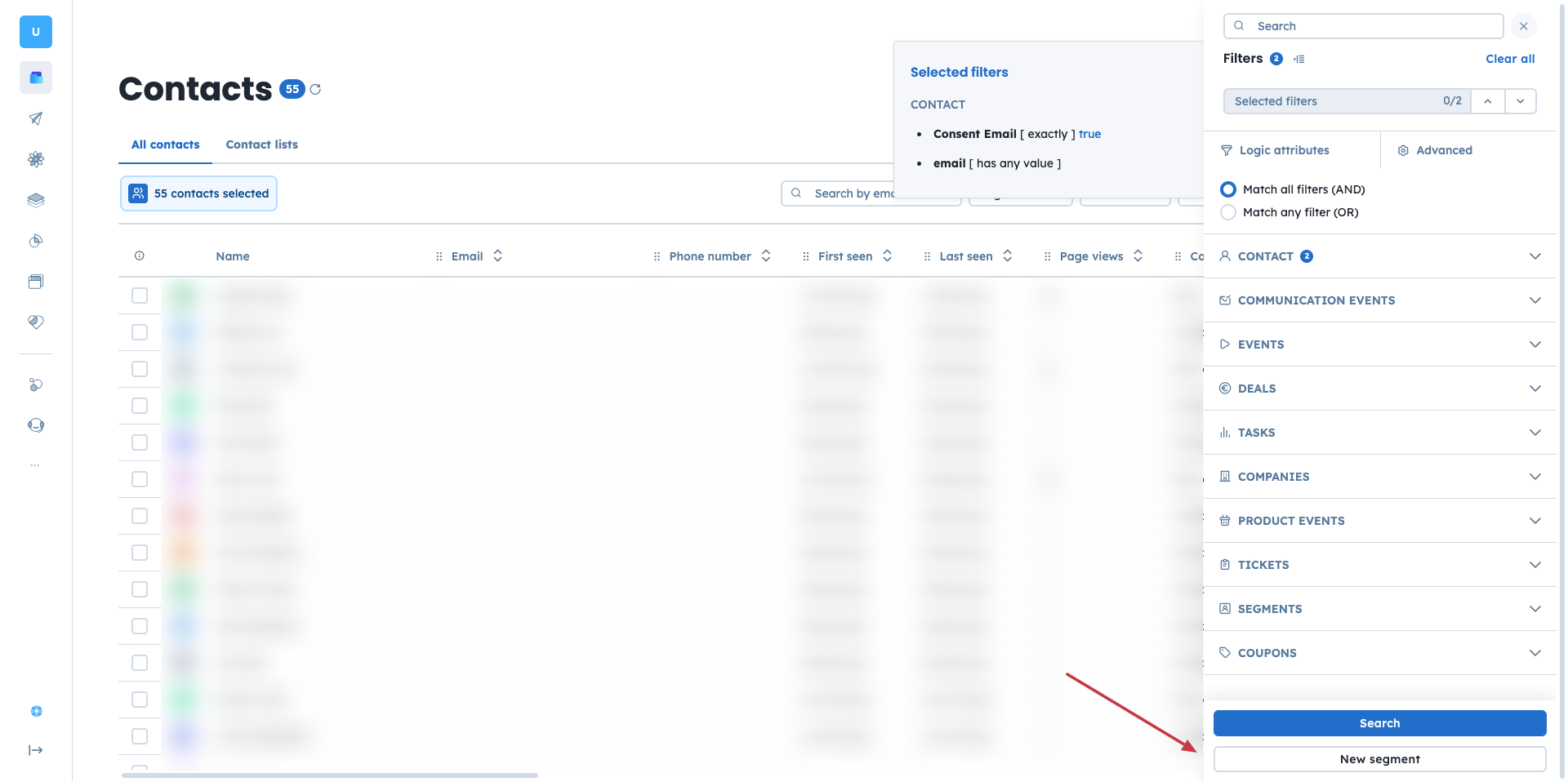
Open the filter panel.
Apply filters, such as email availability and email marketing consent, to define your group.
Click “New segment” at the bottom of the filter panel.
Set the segment name and description. Use a consistent naming convention to keep your workspace clear.
Define which team members should not see this segment.
Confirm your settings.
After creation, the segment becomes available:
In the “Segments” dropdown in the related Data section
In the “Segment” module in Automation
In the “Segments” section of the filters
Segments support many everyday workflows by keeping your data structured and always current.
Contacts Segments For Retention Campaigns
You want to re-engage contacts who made multiple purchases in the past but have not visited your website in the last 40 days and have a total order value above $800.
Solution:
Create a contacts segment using the following criteria:
Number of orders: more than 4
Last visit: more than 40 days ago
Total order value above $800
Email marketing consent enabled
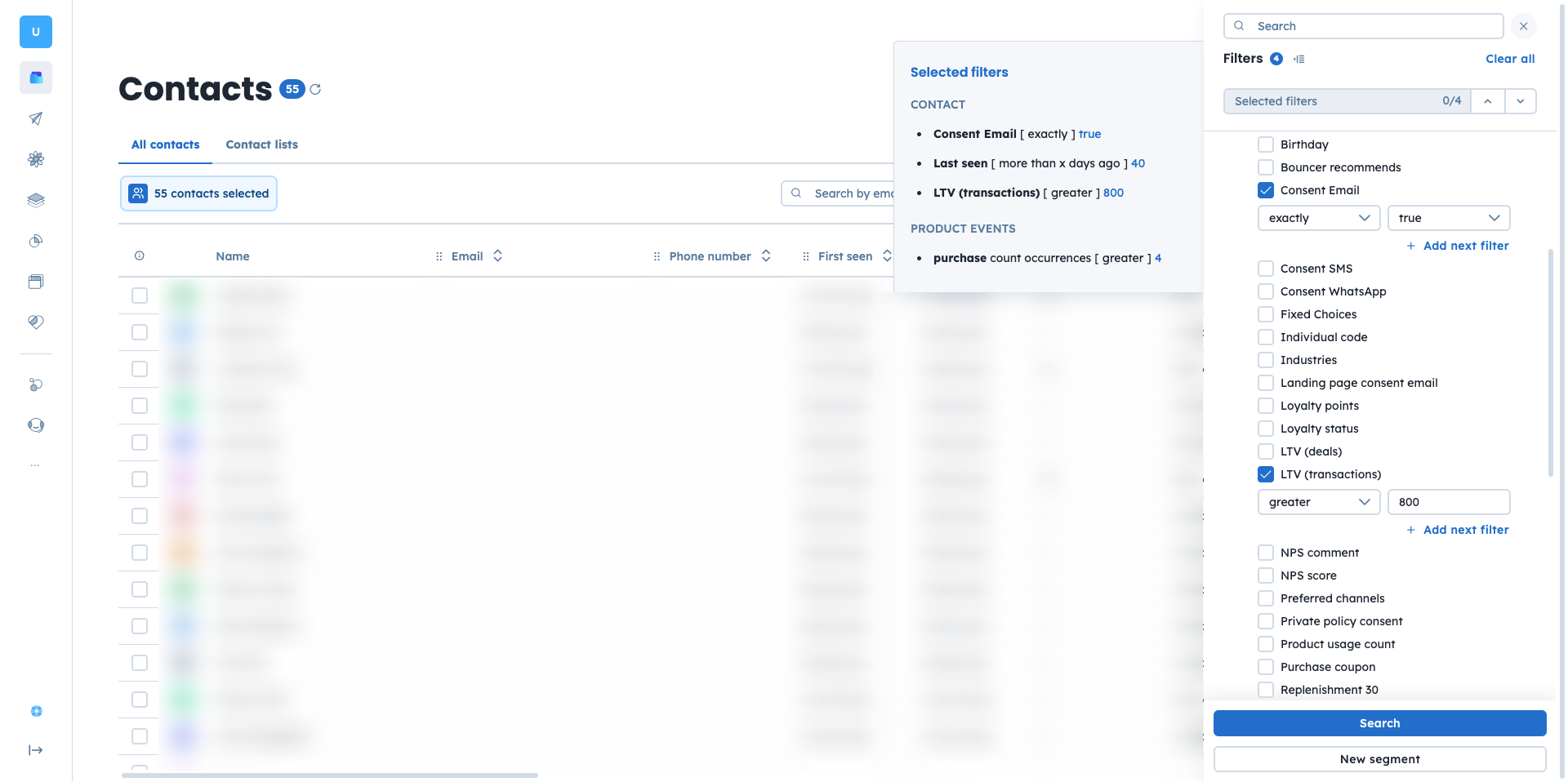
Once the segment is ready, you can use it while creating email or SMS campaigns or as a condition in automations. This allows you to send personalized offers, product recommendations, or invitations that match each contact’s previous behavior.
As a result the targeted communications are highly personalized, reflecting the customers' previous interactions and preferences, making them more likely to re-engage with the brand. This approach helps in recovering potentially lost customers and boosting their lifetime value.
