
A preheader is a short summary text that follows the subject line when a contact views an email in their inbox. This helps your team provide immediate context to your message, ensuring your emails look professional and land with more impact.
Step-by-Step
Every individual email message in Positive User can have its own unique preheader, allowing for high levels of customization.
Open the email editor. Navigate to the specific email message you want to edit and open it within the simple email editor.
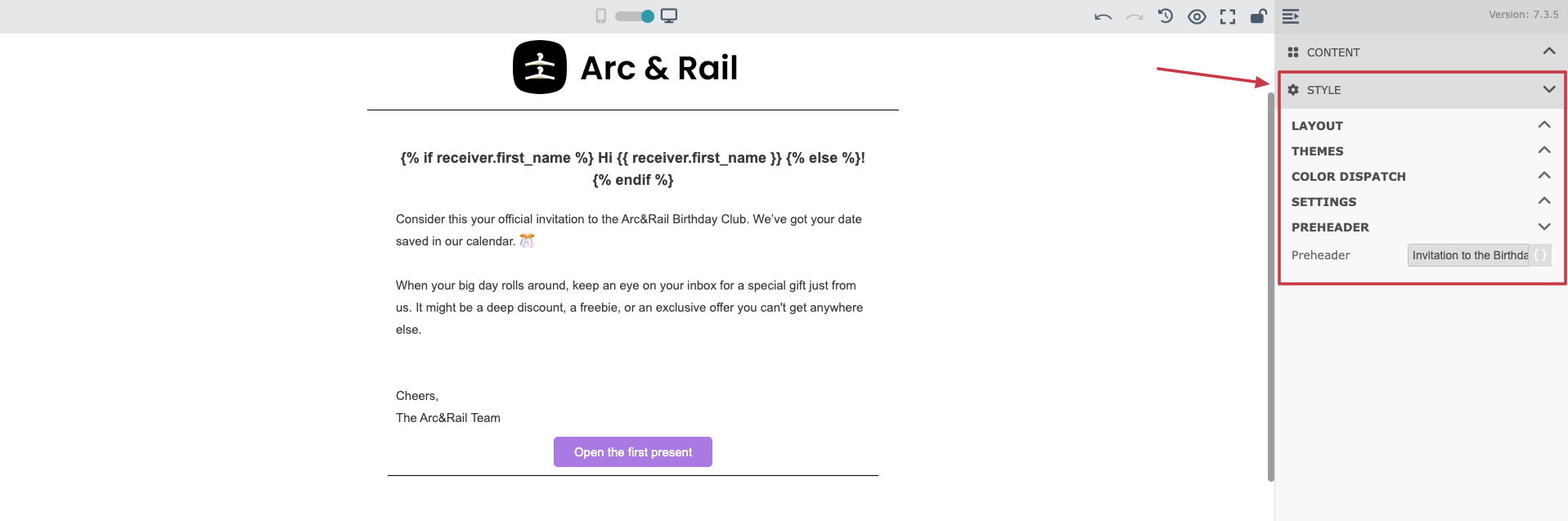
In the menu on the right side of the screen, click on "Style".
Scroll to the "Preheader" subsection. Type the summary text you want to be visible to your contacts in their inbox.
 If you are running an A/B test on your campaign, you can set a different preheader for each version of your message to see which one performs best,
Use Cases
A/B Testing: You can use different preheaders for different versions of the same email to see which preview text drives higher engagement.
Enhanced Credibility: Use this space to summarize your offer or news, making your email look more professional to your contacts before they even click.