By default, Positive User adds a tracking element (__ca__chat) to every link in your emails to help your team see how contacts engage with your messages. However, this tracking element can prevent specialized links (like phone numbers or email addresses) from opening the correct native applications on a contact's device. Adding a simple tag stops this tracking behavior so these specific links work smoothly - insert a link using a specialized protocol, such as “tel:” for phone numbers or “mailto:” for email addresses.
Open your email draft and follow these instructions to exempt specific links from automatic tracking.
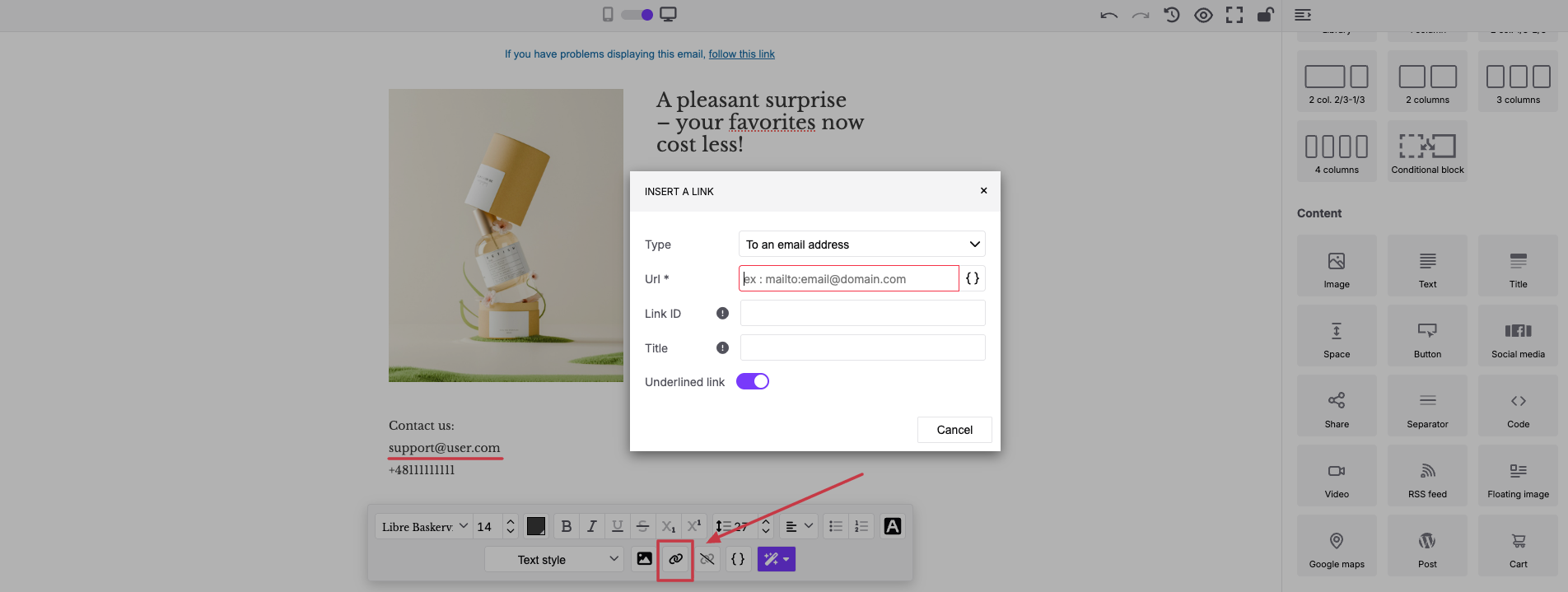
Open your email draft, select the text block you want to edit, and highlight the specific words that will trigger the email or phone application on the recipient's device.
Click the "link" icon on the pop-up text formatting toolbar.
In the "Insert a Link" pop-up window, select either "To an email address" or "To a phone number" from the "Type" dropdown menu.
Enter your destination in the "url" field using the mailto:[email protected] or tel:123456789 format.
You can also adjust the design styling by toggling the "Underlined link" switch.

Direct Email Links: Add a “mailto” link to your support email address so contacts can instantly launch their local mail app to message your team.
Click-to-Call Phone Numbers: Add a “tel” link to your phone number in your email footer so mobile contacts can call you with a single tap.
