Actions are the operational "muscles" of your workflows in Positive User. While triggers and conditions act as the senses and the brain of an automation, actions are the modules that perform the actual work once a contact reaches them. By automating these steps, your team can instantly engage contacts when they show interest, ensure your database stays clean without manual entry, and hand off leads to team members at the perfect moment.
Automation actions are the individual building blocks within a workflow that execute specific tasks after a contact triggers an automation and meets your defined conditions. They allow you to communicate across multiple channels, maintain accurate profile records, and manage internal sales workflows automatically.
You can find all action modules in the right sidebar of the "Automations" editor. They are primarily located under the "Actions" (orange) and "Chatbot" (green) tabs, making them visually distinct from triggers or conditions.
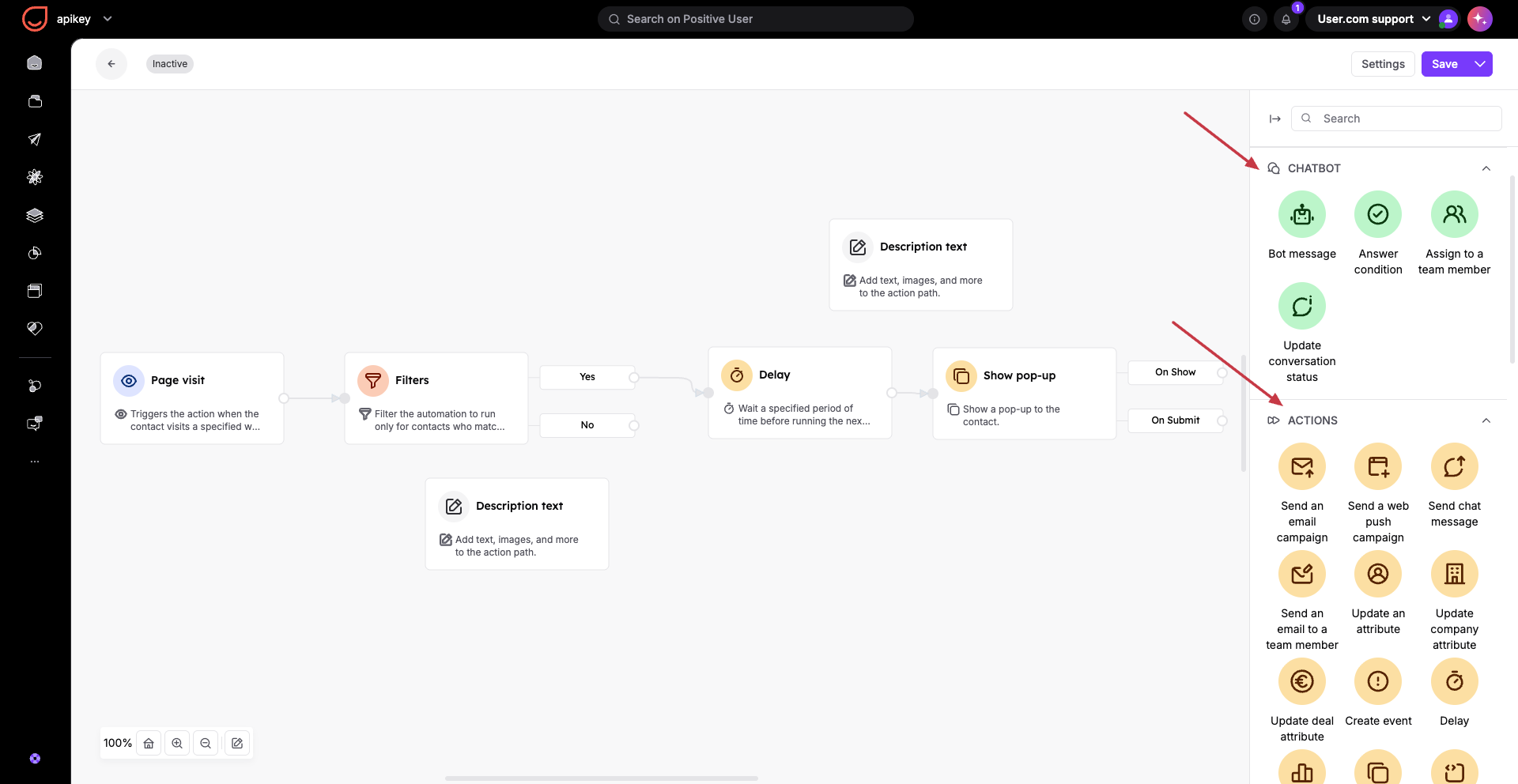
The system organizes action modules into distinct visual groups to help you quickly build your workflows:
Chatbot Actions (Green modules): These modules are dedicated specifically to your chat widget, chatbot, and live conversations. They allow you to build automated conversation flows, route chats, and manage support interactions.
Standard Actions (Orange modules): These cover broader workflows across the platform and are divided into three functional categories:
Communication: Direct interactions where the system speaks to your contacts across channels like emails, SMS, or website pop-ups to engage them instantly.
Data Management: Behind-the-scenes database maintenance that updates records, logs custom milestones, and adjusts attributes to keep your data clean.
Internal Operations: Internal workflows that streamline team handoffs by automatically creating sales deals, assigning tasks, or setting up internal alerts.
Here is the complete list of available action modules you can use within your automation flows.
Bot Actions:
Bot message
Answer condition
Assign to a team member
Update conversation status
Standard Actions:
Send an email campaign
Send a web push campaign
Send chat message
Send an email to a team member
Update an attribute
Update company attribute
Update deal attribute
Create event
Delay
Change score
Show pop-up
Custom widget
Website events tracker
Add to list
Remove from list
Add a note
Add tag
Remove a tag
Create a task
Offer coupon
Check coupon
Create a deal
Change deal status
Update numeric contact attribute
Team member push notification
API call
Calculated attribute
Send SMS campaign
Send mobile push notification
Send mobile in-app message
Finish path
Send code
Update ticket attribute
Create a ticket
Show web push prompt
Team member web notification
Change global variable value
Add to segment
Remove from segment
Issue wallet card
Update wallet card
Send mobile wallet notification campaign
Send WhatsApp campaign
Always check your connections in the flowchart. Actions operate on the principle of execution, meaning a module will only perform its task if a contact successfully arrives at that exact spot. If you leave a module disconnected, it becomes a dangling action and will never run.
Avoid over-tagging your database for every minor action. Use "Update an Attribute" for values that frequently change (like a lead score) and save "Add Tag" for permanent, static milestones (like attending a webinar).
