Running successful marketing campaigns across multiple channels requires precise data to understand what truly drives engagement. Without clear tracking, it is impossible to know whether a new lead came from a paid Facebook ad, a partner's newsletter, or an organic search.
In Positive User, leveraging UTM parameters empowers you to pinpoint the exact origin of the contacts entering your database. This foundational tracking eliminates the guesswork from your marketing strategy, allowing you to accurately measure campaign ROI, build highly targeted segments, and trigger personalized automations based on proven results.
UTM (Urchin Tracking Module) parameters are short text codes added to the end of a URL. In the context of Positive User, they allow you to track the source, medium, and campaign name of the traffic arriving at your website. By appending these tags to your links, you can pass specific data into Positive User about exactly how contacts are finding your business.
Example URL, UTM parameters highlighted, after the question mark (?):


There are standard UTM parameters you can use:
utm_source: Identifies the advertiser, site, or publication (e.g., google, newsletter).
utm_medium: Identifies the advertising or marketing medium (e.g., cpc, banner, email).
utm_campaign: Identifies the individual campaign name, slogan, or promo code (e.g., spring_sale).
utm_term: Identifies paid search keywords.
When a contact clicks a link containing UTM parameters, the data is captured by Positive User.
To make it work you need to follow the steps:
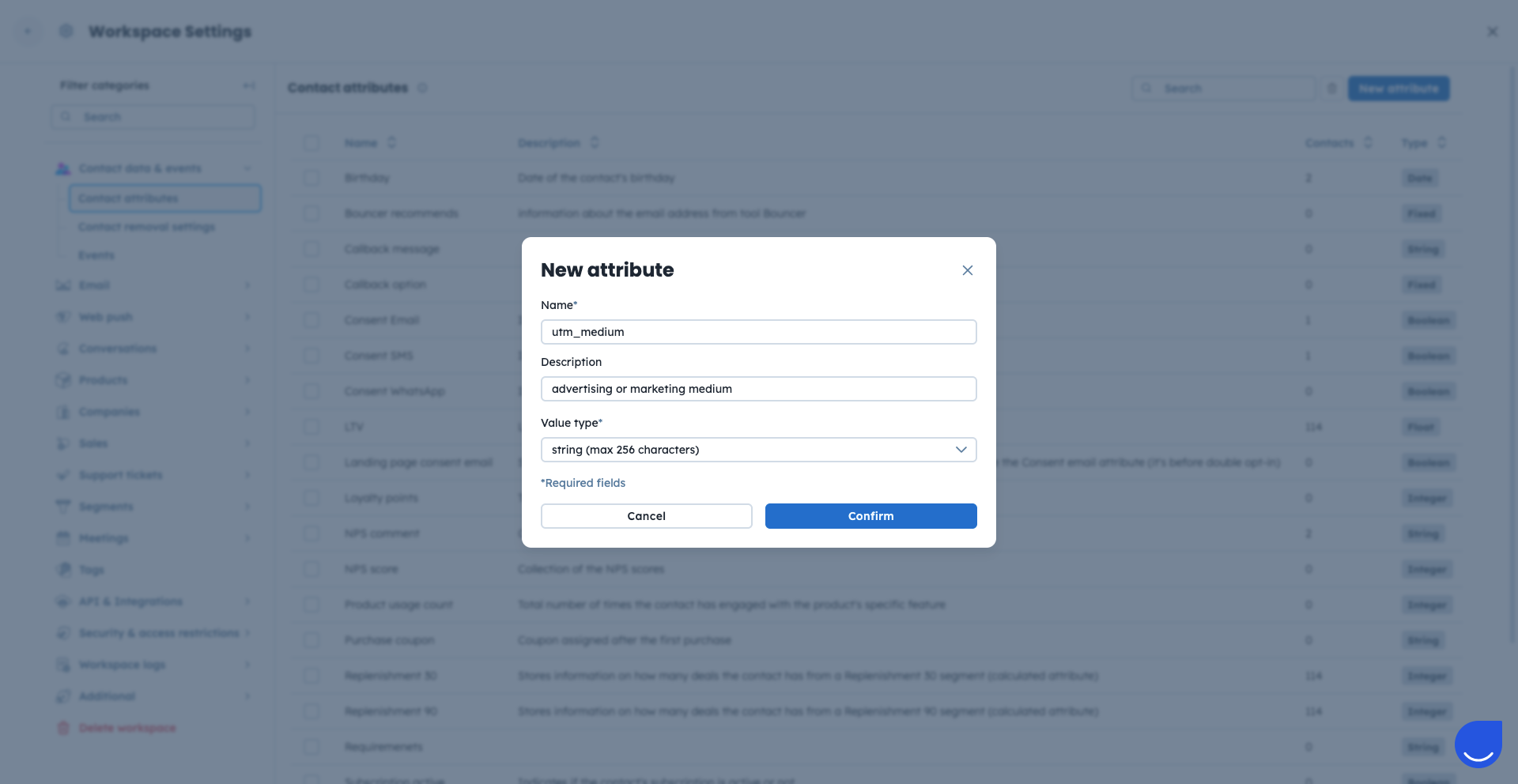
To store the values you need to create the attributes for UTMs. Go to “Settings” → “Workspace Settings” → “Contact attributes”.
Here find the “New attribute” button inn top right corner.
Create the attributes for all the UTM tags you want to store in the contacts’ profiles. Use “string” as the attribute type.
To view a contact's UTM parameters, go to the contact’s profile → “Personal information” section.
Learn more about UTM storage in a dedicated article “How to Store UTM tags” [LINK]
A fully constructed UTM link consists of your base webpage URL, followed by a question mark (?), and the individual UTM parameters connected by ampersands (&).
Example:
https://yourwebsite.com/promo?utm_source=newsletter&utm_medium=email&utm_campaign=spring_saleYou can use Google UTM Builder. Thanks to it you will easily create links with UTM parameters.
You can easily incorporate these links into your Positive User campaigns in two different ways. First, you can manually paste a pre-built UTM link into each specific button or text hyperlink while working on your content inside the Email Builder.
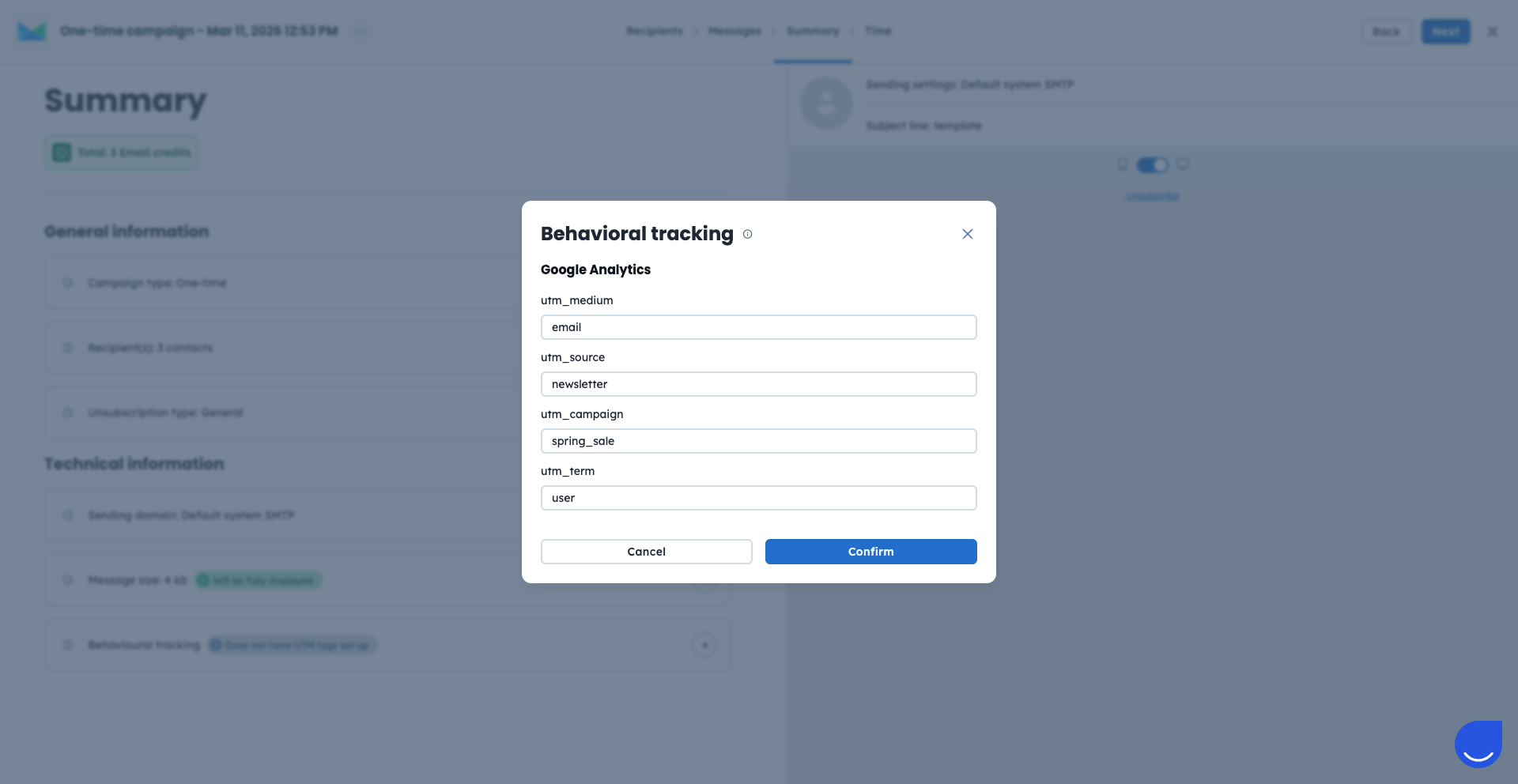
Alternatively, you can apply them globally. Go directly to the "Summary" step of the campaign configuration and locate the "Behavioral tracking" section. Here you can fill in the “utm_source”, “utm_medium”, “utm_campaign”, and “utm_term” fields straight away. The system will automatically append all these UTMs to every single link you have in your campaign.
Segmenting your database based on UTM properties: You can identify which contacts came from your recent Facebook ad to measure its exact conversion rate. Filter out the contacts in the “Contacts” section - this allows you to instantly see the list of acquired leads and segment your database based on UTM properties.
Personalizing campaigns using UTM values: Trigger a tailored campaign or a pop-up, when a contact lands on your page with a specific UTM tag. UTM tag gives you an information about contact’s preferences and insterests.