A deal helps you track and manage sales opportunities in a structured and transparent way. It represents a potential transaction that moves through your sales process, from the moment a contact shows interest to a successful close or a lost opportunity.
In User.com, deals connect your sales activities, contacts, companies, products, and tasks in one place. This makes it easier for you to prioritize follow-ups, forecast revenue, and keep your entire team aligned around what matters most.
A deal in User.com represents a single sales opportunity or business transaction that you want to track in your CRM. It reflects the full sales journey, starting with early interest and ending when the deal is marked as won, lost, or postponed.
Each deal has its own profile where you store key details such as deal value, expected close date, current stage, assignee, and related tasks. You can create and manage deals manually or generate them automatically using Automation, based on contact behavior or events.
Every deal has a dedicated profile that gathers all relevant information about the opportunity in one place. The deal profile gives you a clear overview of the deal’s status, value, and history, helping you manage sales efforts in a consistent and organized way.
You can send an email to the primary contact assigned to the deal, add a task for your team member or yourself or update the details of the deal.
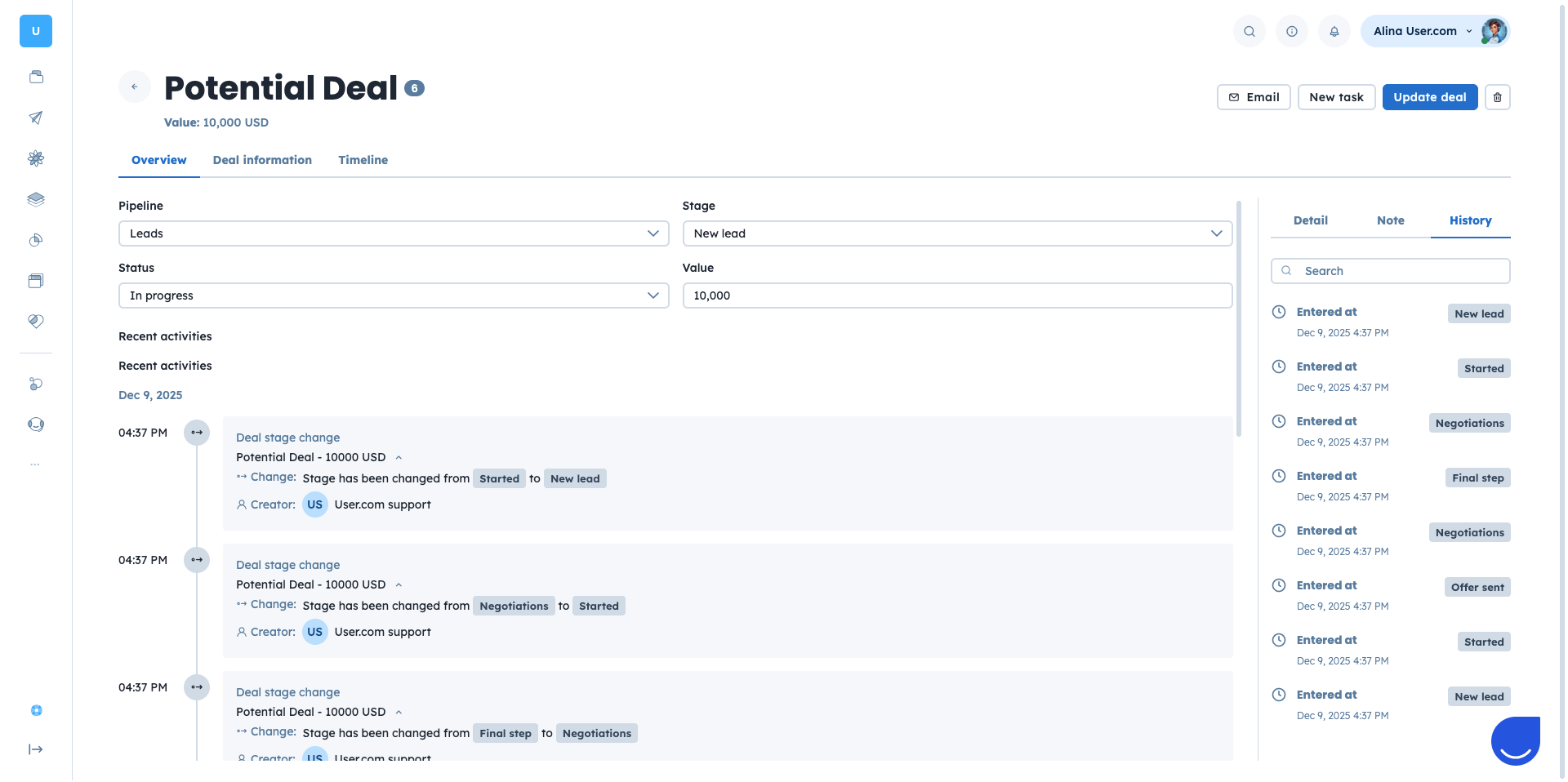
If you want to go through a detailed overview of the deal’s profile, please check a dedicated article. [LINK]
Deals are a core part of the User.com “Sales” module and are closely connected to other objects in the platform. These relationships help ensure your pipeline reflects real interactions and supports collaboration between sales, marketing, and support teams.
Key connections include:
Contacts: Every deal must be linked to a contact who represents the main person involved in the opportunity. This allows you to track conversations and engagement at an individual level.
Companies: Deals can optionally be linked to a company, which is especially useful for B2B scenarios with multiple decision-makers.
Products: Deals can include one or more products, with quantities and pricing, giving you better insight into revenue and customer interest.
Tasks: Calls, meetings, or follow-up tasks linked to the deal.
Every deal is created within a pipeline and assigned to a specific stage, which reflects its current status in your sales process (“New”, “Qualified”, “Proposal Sent”, etc.).
You can create deals in the following ways:
Manually: Adding a deal in the “Sales” → “Deals” section, using either the table view or the pipeline view or from the profile of the object deal relates to (contact/company).
Automatically: Through the automation flow, based on contact actions or conditions, such as submitting a form or reaching a defined score.
Via REST API or other integration - using User.com API docs.
Deals can be added at any stage, depending on where the opportunity enters your sales process.
For detailed instructions, see the dedicated “How to Create a Deal” article.
You can also use deals as orders by storing order details directly in a deal using the “order_products” attribute. This attribute lets you associate structured product data, such as “product ID”, “quantity”, “value”, and “currency”, with each deal.
Order data can be added or updated through public API endpoints. When the attribute has a value, it is visible in the deal profile and can be accessed using dynamic content. This makes it easy to include order details in emails, chat messages, or other templates.
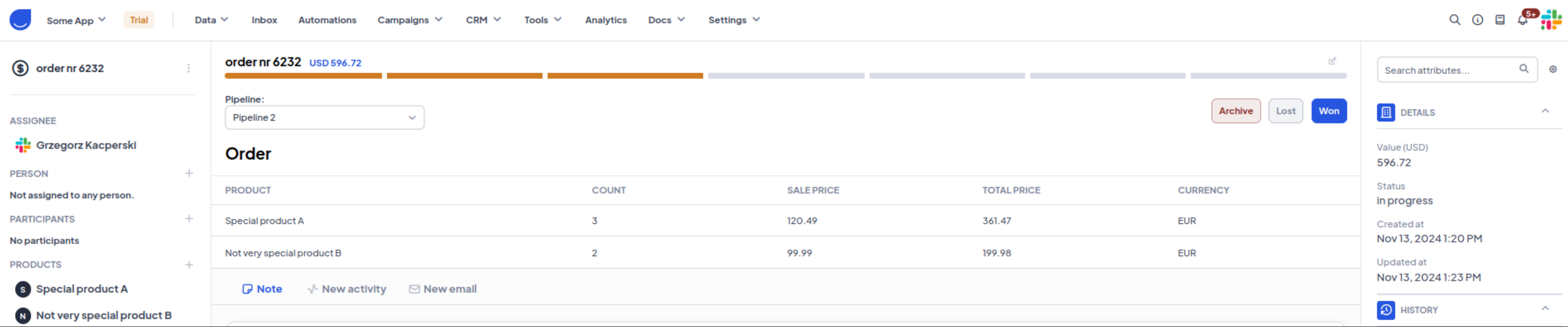
The “order_products” attribute stores data in the following format:
 [
    {
        "product_id" OR "product_custom_id": "value",
        "quantity": value,
        "value": value,
        "currency": "value"
    }
]
You can populate this attribute using public API endpoints such as:
• POST /deals/
• PATCH /deals/:id/
• PUT /deals-by-id/:custom_id/
• POST /deals/update_or_create/
The "order_products" value can be returned with public API or be shown in the Deal profile (if the attribute has a value).
You can also print order details using deal snippet tags in emails, chat messages, or other templates.
For example:
{% deals for_last_days=1 count=5 filter_by='created_at' order_by='created_at' order=1 as deal_list %}
{% for deal in deal_list %}
    id: {{ deal.id }}
    custom id: {{ deal.custom_id }}
    name: {{ deal.name }}
    value: {{ deal.value }}
    value usd: {{ deal.value_usd }}
    ca string: {{ deal.ca_string }}
    custom int: {{ deal.custom_int }}
    {% for order in deal.order_products %}
        name: {{ order.product.name }}
        description: {{ order.product.description }}
        custom id: {{ order.product.custom_id }}
        product url: {{ order.product.product_url }}
        image url: {{ order.product.image_url }}
        special price: {{ order.product.special_price }}
        target group: {{ order.product.target_group }}
        brand name: {{ order.product.brand_name }}
        city: {{ order.product.city }}
        country: {{ order.product.country }}
        order_quantity: {{ order.quantity }}
        order_currency: {{ order.currency }}
        order_value: {{ order.value }}
    {% endfor %}
{% endfor %}
By combining transactional and relationship data in one place, deals help you streamline operations and keep your teams aligned.
Deals are essential whenever you need to track a potential sale, business opportunity, or transaction that moves through a structured process before closing. They are especially powerful in B2B environments, where multiple conversations, meetings, and decision-makers are involved, but they are just as useful for B2C businesses managing high-value or longer-cycle sales.
Automations: You can automatically create or update deals when contacts perform important actions, such as submitting a form, requesting a quote, or reaching a specific score. This keeps your pipeline up to date without manual effort.
Sales Pipeline Management: You want to track individual sales opportunities linked to specific contacts or companies, especially when sales process includes multiple steps or stages (e.g., qualification, proposal, negotiation, closed won/lost). Deals help you track opportunities across multiple stages, prioritize follow-ups, and make sure no opportunity is missed during the sales process.
Revenue Forecasting: By assigning values and stages to deals, you can forecast future revenue and better understand the health of your sales pipeline.
Account-Based Sales: In B2B scenarios, deals linked to companies allow you to manage multiple contacts, conversations, and tasks within a single opportunity.
How to Create a Deal
How to Manage Deals
Deal Profile Overview
Sales Module Overview
Module Guide: Deal Updated Trigger
Module Guide: Deal Stage Changed Trigger
Module Guide: Deal Created Trigger
Module Guide: Create a Deal Action
Module Guide: Update Deal Attribute Action
Module Guide: Change Deal Status Action
