When you send marketing emails, knowing who opened your message or clicked a link offers valuable context for your marketing team. However, data protection rules in some regions require contacts to give explicit consent before you can track their email behavior. Balancing deliverability with strict data privacy is essential for building trust with your audience.
Positive User gives your team workspace-wide control over email tracking. By understanding how email tracking works and when to turn it off, your team can align campaigns with legal standards while maintaining seamless communication.
Email tracking allows you to measure campaign performance by monitoring when recipients open your messages or click on embedded links. In Positive User, this behavioral tracking relies on an invisible 1x1 transparent tracking pixel embedded in the email's HTML code, alongside modified link structures. When an email is opened, the pixel loads and logs the event, capturing open time. Positive User automatically appends a tracking parameter (__ca__chat) and a unique key to links in your message. When a contact clicks a link, the system registers the click for your campaign metrics, sets a cookie to connect their website activity with their contact record, and directs them to the target webpage.
More about it: “How Email Opens and Clicks Are Tracked”
To align with modern privacy standards and guidance from European data protection authorities (such as France's CNIL and Italy's Garante), recipients must give explicit consent before their email engagement can be tracked.
In Positive User, email tracking is controlled at the workspace level. Turning tracking off disables both open tracking (the invisible pixel) and click tracking (the “__ca__chat” link parameter) simultaneously across all one-time and automated campaigns.

To change tracking settings in Positive User (available for admins only):
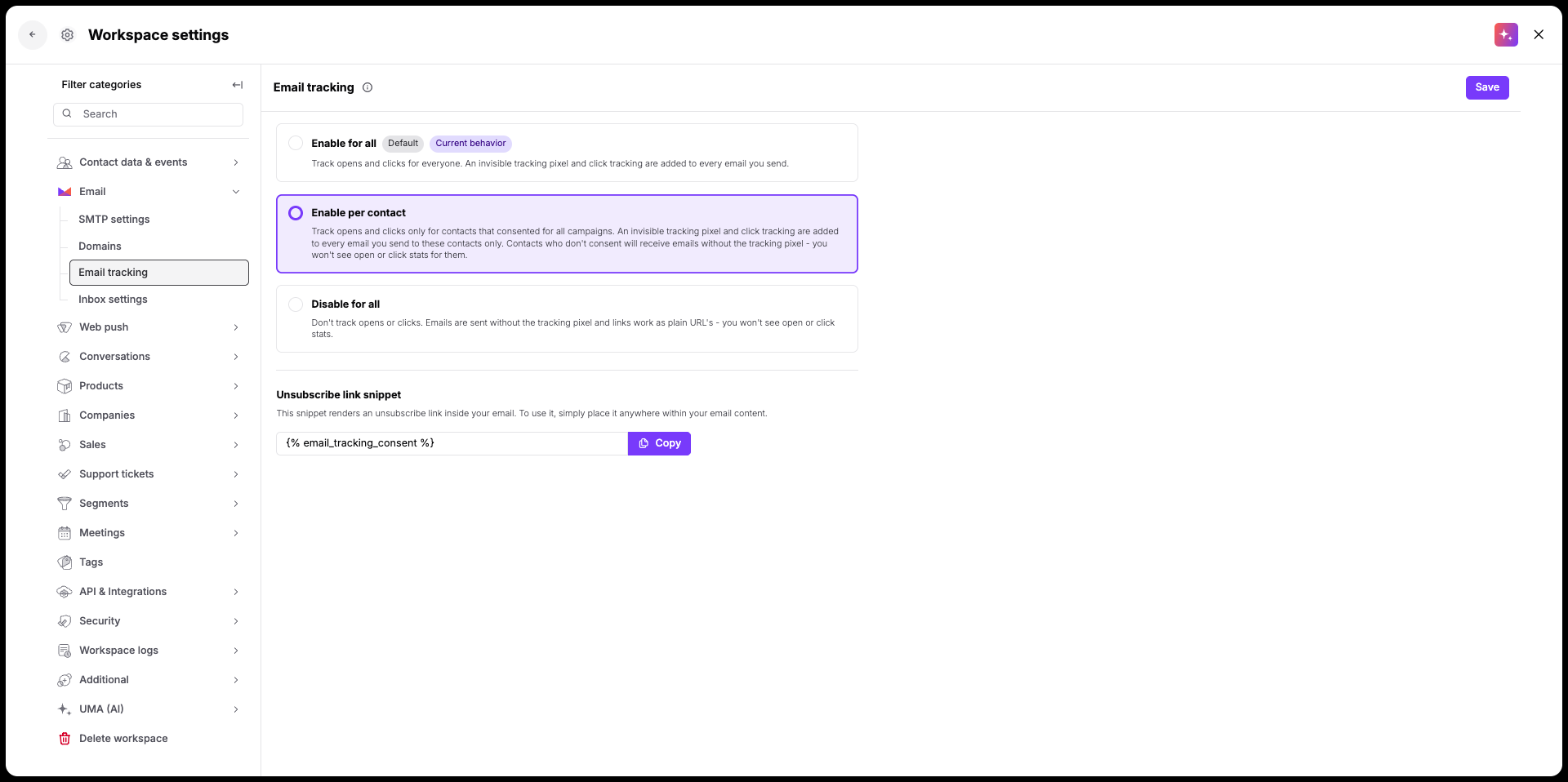
Navigate to “Workspace settings” → “Emails” → “Email tracking”.
Select your preferred mode:
Enable for all (Default): Every email sent from Positive User includes the invisible pixel and link tracking parameter (__ca__chat).
Enable per contact: Attaches pixels and wrapped links only for contacts whose consent status attribute (Email tracking consent) is explicitly set to “true”. Contacts with “false” or “none” receive untracked emails.
Disable for all: Emails are sent without tracking pixels or parameter-modified links. Links function normally as standard URLs.
Confirm your selection in the pop-up dialog. Turning off tracking does not remove statistics from campaigns sent while tracking was active.

There is a standard contact attribute called “Email tracking consent” with a boolean type.
It might have three values:
None (default): The contact has not made a choice. This state behaves identically to “false” and blocks tracking until explicit consent is given, if you have “Enable per contact” mode on.
True: The contact has explicitly consented to tracking. Tracking pixels and wrapped links are added to their emails (unless you have “Disable for all” mode on).
False: The contact has explicitly opted out. Emails are sent untracked.
If you have consents collected from the outside, you can always import them along with other contacts details.
Disabling tracking workspace-wide or setting it to "Enable per contact" affects how features behave across Positive User:
Area | Behavior for “Disable for all” | Behavior for “Enable per contact” |
Link Behavior | All links in your emails remain fully functional for recipients, but clicks will not be logged for all contacts. | All links in your emails remain fully functional for recipients, but clicks will not be logged for the recipients without clear consent. |
Campaign Creation | An informational banner appears in the “Summary” step (depending on the chosen tracking option: "Email tracking is off. The behavioral tracking displays open & click tracking off. | An informational banner appears in the “Summary” step: “Email tracking per contact”. The behavioral tracking displays open & click tracking showing the the percentage of tracked emails . |
A/B Testing | The “Add A/B testing” option is hidden during campaign setup, as A/B testing relies on engagement metrics. | The “Add A/B testing” option is available. |
Automations | A yellow “Open & click tracking off” badge appears in the workflow builder. Any automation steps relying on email opens or clicks (action triggers/conditions) will be flagged and will not fire. | A yellow “Open & click tracking per contact” badge appears in the workflow builder. Any automation steps relying on email opens or clicks (action triggers/conditions) will fire only for contacts with the tracking consent. |
Email statistics depend on whether tracking was active at the moment the email was sent, not on your current workspace setting.
Sent with Tracking ON: Complete open and click data remain visible in reports, even if workspace tracking is disabled later.
Sent with Tracking OFF: No tracking pixel is included at send time, meaning no engagement data is collected.
Sent with Tracking based on consent: open rate and click rate for all campaigns are calculated only against contacts who had pixel tracking at delivery.
How reporting views display untracked data:
Area | Behavior for “Disable for all” | Behavior for “Enable per contact” |
Campaign Details | The “Open & Click Rates” sections and “Engagement Metrics” display empty values (-). An overlay indicates: "Open and click tracking is off". | The “Open & Click Rates” sections and “Engagement Metrics” display percentage of tracked emails as additional information. |
Contact Details | The “Emails” section in the contact profile shows dashes (-) under open and click columns. | The “Emails” section in the contact profile shows data based on the tracking status. |
Campaign List & Aggregated Email Stats | The overall campaign list view and high-level aggregate email statistics remain accessible in Positive User. | The overall campaign list view and high-level aggregate email statistics remain accessible in Positive User. |
Delivery Logs: | You can verify tracking status per email by exporting the CSV, which contains a “tracking_enabled” column (values: “t” for true, “f” for false). This parameter shows the status at the moment of delivery. | You can verify tracking status per email by exporting the CSV, which contains a “tracking_enabled” column (values: “t” for true, “f” for false). This parameter shows the status at the moment of delivery. |
To remain compliant with personal data protection regulations, consider implementing the following practices in your collection and sending strategy.
Sign-up Forms: Include an unchecked checkbox on your web forms allowing subscribers to explicitly opt in to behavioral email tracking and confirm it in the email message. Ensure your privacy policy and informational notices are updated accordingly.
Alternative Collection: If collecting details offline or via third parties, request tracking consent through a follow-up email where only the consent button link is tracked.
Follow-up Frequency: If a contact does not respond to a consent request, wait at least six months before attempting to ask again.
Record Keeping: Maintain logs with timestamps and consent state within your own database to present during potential data protection audits.
Dedicated Unsubscribe Link: Provide a separate, traceable link in your emails specifically for opting out of tracking pixels and link tracking. This must remain independent from the main newsletter unsubscribe link. Copy the snippet below and use it in your email messages.
{% email_tracking_consent %}Confirmation Page: The link above redirects to a confirmation page, where a recipient can subscribe or unsubscribe from open&click tracking.
Preference Center: Consider implementing a central preference center where recipients can independently manage their tracking and subscription choices.
Immediate Application: As soon as a contact revokes consent, their preference must be respected for all subsequent communications.
You can read more about an email tracking opt-in and opt-out process in our dedicated article.
